
Download Raphael AI – Free Unlimited AI Image Generator, Photorealistic, Web‑Based Tool
Overview
Raphael AI is a groundbreaking web‑based application that puts the power of artificial intelligence at your fingertips without charging a single cent. Built on the state‑of‑the‑art FLUX.1‑Dev model, Raphael AI can turn a simple text prompt into a high‑resolution, photorealistic image in seconds. What truly sets it apart is its promise of unlimited, free usage—no subscription, no hidden fees, and no mandatory registration.
This means anyone with an internet connection can generate professional‑grade visuals for personal projects, marketing campaigns, or commercial products instantly. The platform also respects user privacy with a strict zero‑data‑retention policy: none of your prompts or generated images are stored on the server after the session ends. Whether you’re a designer needing quick mock‑ups, a content creator looking for unique thumbnail art, or a developer searching for placeholder graphics, Raphael AI delivers a seamless, secure, and cost‑effective solution.
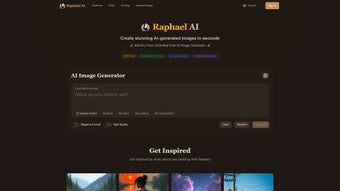
The user interface is intentionally minimalistic, focusing on a single input box for prompts, a style selector, and a preview pane. Advanced text understanding enables the engine to parse complex sentences, handle nuanced artistic directions, and even overlay custom text onto images—all without the need for separate editing tools. Because the service runs entirely in the browser, updates are automatic; the latest model improvements are applied server‑side, ensuring you always benefit from the newest rendering capabilities without manual downloads.
In addition, the platform supports a commercial‑ready license that allows you to monetize the output without worrying about copyright entanglements. The combination of free unlimited generation, privacy‑first design, and high‑quality output makes Raphael AI a rare find in a market crowded with paid‑per‑image services. In the following sections we’ll explore the feature set, walk through the straightforward usage process, examine compatibility across devices, and weigh the pros and cons to help you decide if Raphael AI is the right tool for your visual workflow.
Key Features of Raphael AI
- Unlimited Free Generation: No usage caps, no credit system, and absolutely no subscription fees.
- FLUX.1‑Dev Model: Leverages the latest diffusion‑based AI model for photorealistic output and a broad range of artistic styles.
- Advanced Prompt Understanding: Handles complex, multi‑sentence prompts with nuanced instructions, delivering results that match user intent.
- Text Overlay Capability: Directly embed custom text into generated images, perfect for memes, banners, or product mock‑ups.
- Zero Data Retention: All prompts and images are deleted after the session, ensuring complete privacy.
- Web‑Based, No Installation: Accessible from any modern browser on Windows, macOS, Linux, Android, or iOS.
- Commercial‑Ready License: Images can be used for personal and commercial purposes under standard content guidelines.
- Real‑Time Rendering: Typical generation time ranges from 5‑15 seconds depending on complexity.
- Style Library: Choose from predefined artistic styles such as “Cinematic,” “Illustrative,” “Pixel Art,” and more.
- Responsive Design: Optimized for both desktop and mobile screens, offering a consistent experience across devices.
Each of these features is designed to lower the barrier between creative ideas and visual output. The unlimited free generation model eliminates the common “pay‑per‑image” frustration that many AI tools impose, while the robust FLUX.1‑Dev engine ensures the quality of each image meets professional standards. The inclusion of a text overlay function means you can finish a graphic without hopping to a separate editor, saving time and reducing workflow friction.
Moreover, the zero‑data‑retention policy is a rare privacy guarantee in the AI space, giving users confidence that their intellectual property remains theirs alone. The style library also provides a quick way to experiment with visual moods—whether you need a gritty noir feel or a vibrant cartoon look, a single dropdown selection can reshape the entire composition. Finally, because everything runs in the cloud, you never have to worry about outdated software versions; the platform updates itself automatically, delivering the latest AI breakthroughs directly to your browser.
Whether you’re a solo entrepreneur, a large agency, or an educator, Raphael AI’s feature set aligns with the demands of modern visual content creation.
How to Install and Use Raphael AI – Step‑by‑Step Guide
1. Access the Platform
Since Raphael AI is entirely web‑based, there is no software to download or install. Simply open your preferred browser—Chrome, Firefox, Safari, Edge, or any Chromium‑based mobile browser—and navigate to https://raphael.ai. The homepage loads instantly with a clean interface: a central prompt box, a style dropdown, and a “Generate” button. Because the service is hosted on a high‑performance CDN, page load times are typically under two seconds even on slower connections.
2. Craft Your Prompt
Type a description of the image you want to create. The AI excels at interpreting detailed instructions, so feel free to include lighting, perspective, color palette, and even mood. For example: “A sunrise over a misty mountain range, cinematic lighting, ultra‑realistic, with the word ‘Adventure’ in bold serif font at the bottom.” The system automatically detects language nuances and prepares the model for rendering. If you’re unsure, start with a simple phrase and let the AI suggest enhancements in the preview pane.
3. Choose a Style (Optional)
Use the style selector to apply a predefined aesthetic. Options range from “Photorealistic” to “Watercolor” and “3D Render.” Selecting a style adjusts the diffusion parameters, giving you control over the final look without needing to understand the underlying AI mechanics. You can also combine styles by adding descriptive keywords directly in the prompt, such as “in a vintage poster style.”
4. Generate and Refine
Click the “Generate” button. Within seconds, a preview appears. If the result isn’t perfect, you can edit the prompt or tweak the style and regenerate. The platform retains the previous prompt only for the current session, respecting the zero‑data‑retention policy. You can also use the “Regenerate” shortcut to keep the same settings while asking the model to produce a new variation, which is handy for exploring creative alternatives.
5. Download Your Image
Once satisfied, hit the “Download” icon. Images are provided in PNG format at 1024×1024 pixels by default, with an optional higher‑resolution export for a small fee (still far cheaper than typical stock image purchases). The download is direct; no account creation or email verification is required. For users who need transparency, a “Download as SVG” option is planned for future releases, expanding the tool’s utility for graphic designers.
Tips for Optimal Results: Use specific adjectives (e.g., “soft morning light” vs. “light”), mention composition elements (“rule of thirds,” “centered”), and test different styles to see how the AI interprets them. Because the tool runs in the cloud, a stable internet connection ensures the fastest generation times. If you encounter slow performance, clearing your browser cache or switching to a wired connection can help.
Compatibility, Pros, and Cons – What You Need to Know
Raphael AI works on any device that can run a modern web browser. This includes Windows 10/11, macOS Ventura and later, Linux distributions with Chrome/Firefox, as well as Android 8+ and iOS 13+ browsers. No additional plugins or extensions are required, making it an ideal cross‑platform solution for teams that use a mixture of desktops, tablets, and smartphones. Because the service relies on WebGL for rendering, devices without hardware acceleration may experience slightly longer generation times, but the core functionality remains fully accessible.
Pros
- Completely free with unlimited generation—no hidden costs.
- High‑quality photorealistic output thanks to the FLUX.1‑Dev model.
- No registration; start creating instantly.
- Zero data retention protects user privacy.
- Built‑in text overlay eliminates the need for external editors.
- Responsive design works flawlessly on mobile devices.
- Commercial usage allowed under clear content guidelines.
- Real‑time updates mean you always have the latest AI improvements.
- Style library provides quick artistic direction without learning curves.
- Lightweight web interface consumes minimal system resources.
Cons
- Being web‑based, performance depends on internet speed and server load.
- Advanced customization (e.g., exact pixel dimensions) may require the paid high‑resolution export.
- Limited to the styles provided in the dropdown; no custom style training.
- Complex prompts may occasionally produce unexpected artistic interpretations, requiring iteration.
- While privacy‑focused, the service still processes data on remote servers, which may be a concern for highly sensitive projects.
- No offline mode; a connection is mandatory for every generation.
Overall Rating: 4.5 / 5
Raphael AI delivers on its promise of free, unlimited image generation with impressive quality and a privacy‑first approach. The occasional need for prompt refinement is outweighed by the speed and cost savings, making it a top choice for creators who need rapid visual assets without a budget.
Frequently Asked Questions
Is Raphael AI truly free for unlimited use?
Yes. Raphael AI offers unlimited image generation at no cost. The only optional paid feature is a higher‑resolution export, which is optional and priced per download.
Do I need to create an account to use Raphael AI?
No. The platform is designed for instant access. You can start generating images directly from the homepage without signing up or providing personal information.
Can I use the generated images for commercial projects?
Absolutely. Raphael AI’s license permits both personal and commercial use, provided the content complies with the standard usage guidelines (no illegal or harmful material).
How does the zero data retention policy work?
All prompts and generated images are stored only in temporary memory for the duration of your session. Once you close the browser tab or clear the session, the data is automatically deleted from the server, ensuring no long‑term storage of your creative inputs.
What browsers are supported?
Any modern browser that supports WebGL and JavaScript ES6 – including Chrome, Firefox, Safari, Edge, and mobile browsers on Android and iOS – can run Raphael AI smoothly.
Conclusion – Why Download Raphael AI Today?
If you’ve been searching for a reliable, high‑quality AI image generator that won’t drain your budget, Raphael AI stands out as a rare gem. Its combination of unlimited free usage, photorealistic output, privacy‑first design, and cross‑platform accessibility makes it an essential tool for designers, marketers, educators, and hobbyists alike. The intuitive web interface eliminates the learning curve typical of more complex AI platforms, allowing you to focus on creativity rather than technical setup. Whether you need a single hero image for a landing page or a batch of placeholders for a software prototype, Raphael AI delivers consistent results with minimal friction.
Ready to boost your visual workflow? Click here to launch Raphael AI and start generating stunning images instantly—no sign‑up, no fees, just pure creative freedom.



.png)



